Family & in-laws
Catch up at the dinner table. No one else has to download anything.
You: How was your week?
🇺🇸🇲🇽
Them: Busy — the kids start school Monday.
Now in beta on iPhone
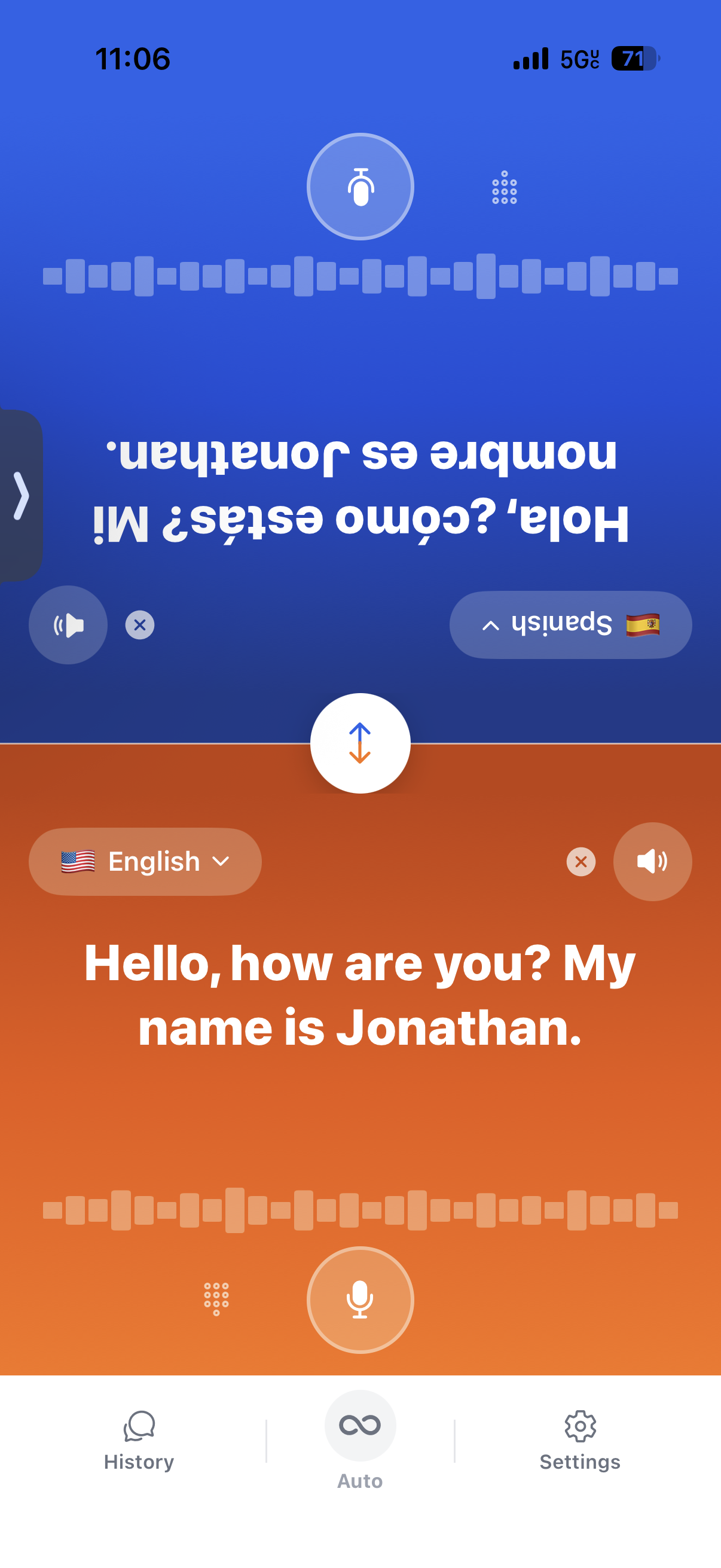
Set your iPhone on the table between you. Each of you speaks your own language — the translation appears on the other person's side of the screen, facing them, and plays out loud.
Free TestFlight beta · 36 languages · No sign-up needed
HOW IT WORKS
Three steps — and nothing for the other person to download or set up.
Choose yours and theirs. Swap either side any time.
Tap the mic on your side, or turn on Auto mode and just talk. Too loud? Switch to the keyboard without losing your place.
The translation appears on their side, facing them, and plays through the speaker.
WHERE IT HELPS
Anywhere two people need to talk across a language gap — not just on vacation.
Catch up at the dinner table. No one else has to download anything.
You: How was your week?
🇺🇸Them: Busy — the kids start school Monday.
Clarify an order or a task with a customer or coworker.
You: Do you need this by Friday?
🇺🇸Them: Thursday afternoon works better.
Taxis, hotel desks, pharmacies and cafés.
You: The hotel on Main Street, please.
🇺🇸Them: About fifteen minutes from here.
Parent–teacher check-ins, neighbors and volunteer desks.
You: How is she settling in?
🇺🇸Them: She's doing well — she already has friends in class.
WHY LINGOORA
Most translation apps are made for looking things up — a menu, a sign, a quick phrase. Lingoora is made for talking with someone. Share one phone, each read your own side, and keep the back‑and‑forth going.
Two panels, one flipped, so each person reads their own side — no passing the phone back and forth.
Auto mode listens continuously and works out which of your two languages is being spoken.
Natural-sounding voices play through the speaker, so the other person hears you over the noise.
Any language can pair with any other — not just with English.
PRIVACY
Past conversations, starred phrases and settings are stored on your iPhone, not on our servers.
There's nothing to sign up for, and we don't sell your data.
To translate, your audio and text are sent over an encrypted connection, through our server, to our AI providers, OpenAI and xAI. An internet connection is required.
Read the privacy policyMachine translation can make mistakes. Please don't rely on Lingoora for medical, legal or safety-critical conversations.
Not yet. It's in a free TestFlight beta while we prepare for launch. Request an invite below and we'll email it to you.
No. You share one iPhone — they simply speak and read on their side of the screen.
No. Lingoora uses online speech and translation, so you'll need Wi‑Fi or mobile data.
On your device. This site’s Privacy Policy explains that conversation history and settings are stored locally.
It listens continuously and detects which of your two languages is being spoken, so neither of you has to tap the mic.
Yes. Switch to the keyboard any time and keep the same conversation going.
Lin-goo-rah. It starts like “lingo,” the “goo” sounds like “moon,” and it ends in “rah.”
Join the free iPhone beta on TestFlight. We'll email your invite.
iPhone · Internet required · History stays on your device